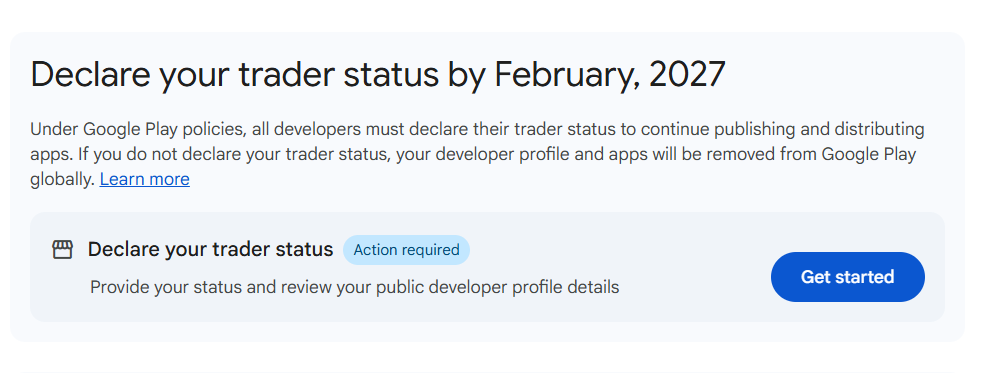
If you’ve logged into your Google Play Console recently, you’ve probably noticed the prompt asking you to declare your Trader Status.
Google gives you a deadline—February 1, 2027—which might make you feel like you can just ignore it for now. But if you dig even slightly into what it means, alarm bells start going off, especially for solo developers running on personal/individual accounts:
“Wait… if I say yes, is Google going to publish my home address and phone number for everyone on the internet to see?”
Here is an honest, straightforward breakdown of what this declaration actually means, who counts as what, and your options if you want to keep your personal information private.
Why is Google even asking this?
Google isn’t doing this just to be annoying. It comes down to consumer protection laws in places like the European Union (EU/EEA) and the UK (specifically regulations like the EU Digital Services Act and consumer rights directives).
Under these laws, European shoppers have a legal right to know whether they are buying a product or using a service from:
- A business/professional seller (a “Trader”), or
- A private individual/hobbyist (a “Non-Trader”).
Because the Play Store serves millions of users across Europe, Google is required to label developers accordingly and make certain contact info visible to consumers.
The Big Question: Are You a “Trader” or a “Non-Trader”?
Google’s legal documentation can feel dense, but when you strip away the legalese, here is how the distinction works in practice:
You are almost certainly a Trader if:
- You make money from your apps: This includes paid downloads, in-app purchases (IAP), paid subscriptions, and ad revenue (like AdMob, Unity Ads, etc.).
- You run apps commercially: Even if you only make a few dollars a month, if your intention is commercial gain or you operate systematically like a business/sole proprietor, consumer law views you as a trader.
- You have a registered company or D-U-N-S number.
You are a Non-Trader if:
- Your apps are 100% free with zero monetization: No ads, no paywalls, no in-app purchases, no affiliate links, no paid pro upgrades.
- You publish strictly as a hobby: Think student portfolios, open-source utilities, passion projects, or tools built for friends/family with zero revenue stream.
The Catch: What Happens If You Select “Trader”?
Here is the part that makes most individual developers sweat.
If you have a personal account and declare yourself as a Trader:
- Google will display your contact email, phone number, and physical address directly on your app’s store listing to users located in regulated regions (like the EU).
- Because personal accounts are tied to your personal identity and Google Payments profile, that address is usually your home address.
Understandably, nobody wants their private living address and personal cell phone posted on a public app store listing.
What Happens If You Just Lie and Pick “Non-Trader”?
It might be tempting to just click “Non-Trader” to protect your home address, especially if you only make $10 a month from ad banners.
Why that’s risky:
- Google has clear visibility into your monetization. If your app serves Google ads or uses Google Play Billing, marking yourself as a “hobbyist who earns no revenue” is a glaring contradiction on your account.
- Misrepresenting your status violates developer policies. It can trigger manual reviews, store-listing blocks, or outright account suspension. It’s simply not worth putting your account on the line.
What Indie Devs Are Actually Doing (Your 3 Real Options)
If you run monetized apps on a personal account, you essentially have three paths forward:
1. Upgrade to an Organization Account (The Cleanest Long-Term Fix)
If you treat your app development as a serious business or side-hustle:
- Register a formal legal entity (LLC, Ltd, etc., depending on your country).
- Get a registered agent, co-working space, or virtual business address.
- Switch your Play Console account to an Organization account (requires a D-U-N-S number).
- The outcome: Your business address and business phone number become the public-facing info, keeping your home completely private.
2. Unpublish / Exclude Affected Regions
If Europe isn’t a meaningful market for you:
- Some indie developers choose to simply uncheck EU/EEA countries and the UK from their app’s country distribution settings.
- If you don’t distribute to consumers protected by these specific regulations, you reduce exposure to these public listing requirements. (Note: Google may still require account-level status declarations regardless of where your apps are distributed).
3. Move to a Truly Free / Donation Model
If your ad revenue is practically pennies and not worth the privacy headache:
- Strip out the ads and in-app purchases completely.
- Keep the app 100% free and open-source.
- Confidently declare as a Non-Trader.
How to Complete the Declaration in Play Console
When you’re ready to fill it out:
- Head over to Play Console → Manage account.
- Click on Account details and look for the About you / Trader status section.
- Select whether you are acting as a Trader or Non-Trader.
- If you select Trader, go into each app’s dashboard under Policy and programmes → App content, confirm the app-level declaration, and ensure you have linked your app’s Terms of Service.
The February 1, 2027 deadline gives you plenty of breathing room, but don’t just leave it until the last minute.
If your apps generate revenue, start thinking now about how you want to handle your business presence—whether that means forming a simple legal entity, setting up a proper business mailing address, or adjusting which markets you target.
Your privacy matters just as much as your apps do.