

The history of digital commerce is a story of removing barriers. In the late 1990s, the “browser era” required us to sit at heavy desktop computers, type in long URLs, and click through endless categories. By the mid-2010s, the “mobile era” put the store in our pockets, but we still had to do the heavy lifting of searching, comparing, and typing in credit card numbers.
The Future of Agentic Shopping: A Complete Guide to Universal Commerce Protocol Salesforce Integration
Now, in 2026, we have entered the Agentic Commerce era. This is where the Universal Commerce Protocol Salesforce integration becomes the most critical asset for any global retailer. In this new paradigm, the cognitive load of shopping shifts from the human to the AI agent. Instead of browsing for hours, a user simply tells their AI, “Find me the best-rated waterproof hiking boots in size 10 and buy them.”

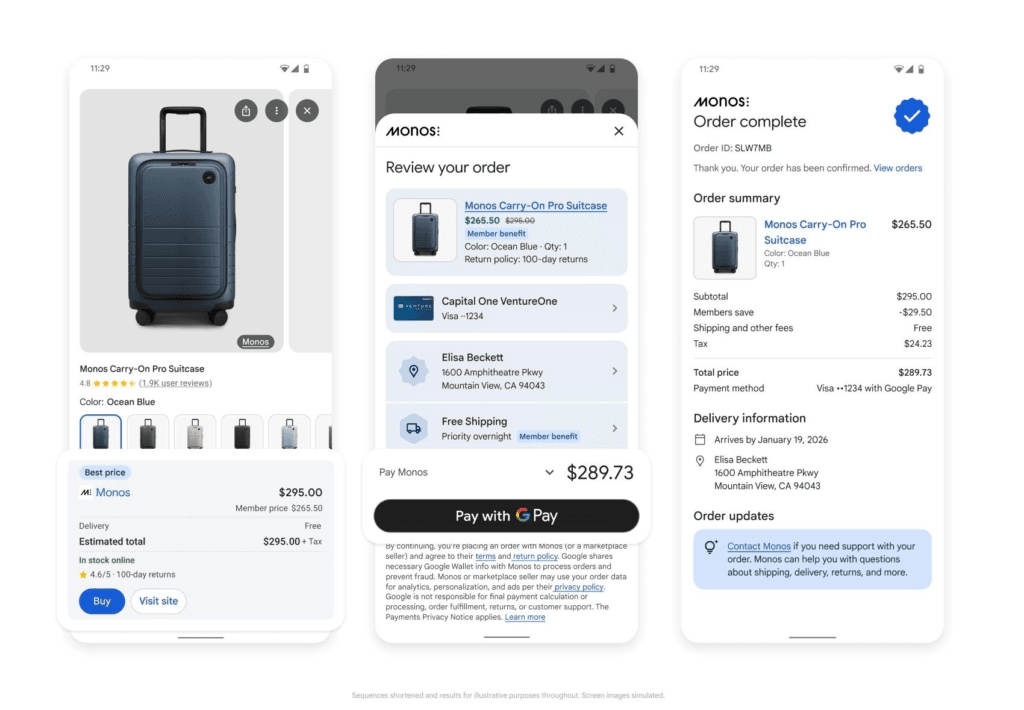
For this to work, your online store must speak the same language as the AI. That language is the Universal Commerce Protocol (UCP). In this guide, we will explore how to integrate this revolutionary protocol with the powerhouse that is Salesforce Commerce Cloud (SFCC), ensuring your brand remains visible in a world where AI does the shopping.
Table of Contents
What is the Universal Commerce Protocol (UCP)?
Before diving into the technical “how-to,” we must define what we are building. Launched in early 2026 by Google in partnership with retail giants like Walmart and Shopify, the Universal Commerce Protocol (UCP) is an open-source standard designed to be the “HTTP of Commerce.”
Just as HTTP allows any browser to read any website, UCP allows any AI agent—like Google Gemini or a specialized shopping bot—to browse, cart, and buy from any online store without needing a custom-coded integration for every single shop.
The Three Pillars of UCP
UCP standardizes three critical phases of the shopping journey:
- Discovery: How the AI agent finds your products, prices, and stock levels.
- Transaction: How the agent securely adds items to a cart and processes payments.
- Post-Purchase: How the agent tracks the package or initiates a return for the user.
Note: UCP operates on a “manifest” system. Your store publishes a digital menu (usually at
yourstore.com/.well-known/ucp) that tells the AI exactly how to talk to your checkout system.
The Great Protocol Divide: UCP vs. ACP
If you are a Salesforce merchant, you might have heard of the Agentic Commerce Protocol (ACP). It is important to understand that we are currently in a “standards war” similar to Beta-max vs. VHS or Blu-ray vs. HD-DVD.
Salesforce, in partnership with OpenAI and Stripe, champions ACP. It works beautifully with ChatGPT and Salesforce’s native “Agentforce” tools. However, Google—which still controls the vast majority of product search traffic—champions UCP.
Comparison: UCP vs. ACP
| Feature | Universal Commerce Protocol (UCP) | Agentic Commerce Protocol (ACP) |
| Primary Architect | Google, Shopify, Walmart | Salesforce, OpenAI, Stripe |
| Native SFCC Support | No (Requires Middleware) | Yes (Native Integration) |
| Primary AI Surface | Google Gemini, Google Search | ChatGPT, OpenAI Ecosystem |
| Payment Method | Modular (Google Pay, Adyen, etc.) | Integrated via Stripe Link |
| Strategy | “Search-to-Buy” | “Chat-to-Buy” |
The Strategic Reality: To win in 2026, a brand cannot choose just one. Since Google Gemini is the gatekeeper for billions of searches, ignoring UCP means your products won’t show up when an AI agent is “buying” for a customer. This makes the Universal Commerce Protocol Salesforce bridge a strategic necessity.
Why Salesforce Commerce Cloud (SFCC) is the Foundation
Salesforce Commerce Cloud (formerly Demandware) is the “brain” of your retail operation. It handles complex pricing, tax calculations, inventory reservations, and global promotions.
The Complexity Challenge
SFCC is an enterprise-grade “Black Box.” You cannot simply “tell” it to create an order. To prevent fraud and errors, SFCC requires a strict sequence of events:
- Creating a secure basket.
- Attaching a customer profile.
- Calculating real-time tax and shipping.
- Validating payment tokens.
- Converting the basket into an official order.
Because AI agents (UCP) prefer simple commands, we need a Translation Layer to turn the AI’s “Buy this” into Salesforce’s complex multi-step workflow.
Architectural Deep Dive: How the Integration Works
To connect UCP with Salesforce, we use a “Middleware” architecture. Think of this as a digital interpreter that sits between Google’s AI and your Salesforce backend.
Phase 1: Discovery (The Digital Menu)
The AI agent needs to know what you sell. Instead of “crawling” your site like an old search engine, it uses your Google Merchant Center feed.
- The Workflow: Salesforce exports your catalog (XML/JSON) to Google.
- The Tip: To prevent the AI from selling “out of stock” items, your middleware must support Real-Time Inventory Checks. When a user says “Buy,” the AI sends a quick pulse to your middleware, which checks Salesforce’s
GET /inventoryAPI to confirm the item is actually on the shelf.
Phase 2: The Transaction (The Translation Layer)
This is where the magic happens. When the user clicks “Buy” in their AI interface, a JSON request is sent to your UCP endpoint.
- The AI Request: “Create a cart for Product SKU-999.”
- The Middleware Action: The middleware receives this and uses SCAPI (Salesforce Commerce API) to talk to Salesforce. It creates a basket, adds the item, and asks Salesforce for the total price (including tax).
- The Response: The middleware sends the final price back to the AI.
- The Payment: The user approves the purchase using Google Pay. A secure “Payment Token” is sent to the middleware, which then tells Salesforce to “Close the order.”
Phase 3: Post-Purchase (The Feedback Loop)
UCP allows the AI to stay updated. When your warehouse ships the item, Salesforce triggers a Webhook. This message goes to the middleware, which updates the UCP status. Now, the user can ask their AI, “Where is my package?” and get an instant answer without opening an email.
Step-by-Step Guide: Implementing UCP on Salesforce
If you are a developer or a technical product manager, here is the high-level roadmap for your Universal Commerce Protocol Salesforce project.
Step 1: Prepare Your Catalog
Ensure your Salesforce instance is correctly synced with Google Merchant Center. You should be using a modern SFCC Cartridge (like the Google Inventory Cloud Cartridge) to ensure your data is clean and formatted correctly.
Step 2: Build the Middleware
You need a secure environment (Heroku, Google Cloud, or AWS) to host your translation logic. This middleware must:
- Handle OAuth 2.0 authentication with Salesforce.
- Translate UCP JSON objects into Salesforce SCAPI calls.
- Maintain a mapping of UCP payment types to Salesforce payment instruments.
Step 3: Publish the Manifest
Create a ucp.json file and host it at yoursite.com/.well-known/ucp. This file tells the world:
- Where your “Create Cart” endpoint is.
- Which payment processors you support (e.g., Adyen, Stripe, CyberSource).
- Your shipping capabilities.
Step 4: Security and Validation
Because AI agents are automated, your middleware must have “Rate Limiting” to prevent bots from spamming your Salesforce API. You must also ensure that all payment tokens are validated through a trusted gateway before the order is injected into Salesforce.
Use Cases: Real-World Examples
1. The Busy Parent (B2C)
- Scenario: A parent realizes they are out of diapers while driving.
- Action: They tell their car’s AI, “Order my usual diapers from [Brand Name] and have them delivered by tomorrow.”
- The UCP Magic: The AI uses the UCP manifest to find the brand’s Salesforce store, checks the “usual” order history via API, calculates the overnight shipping cost, and completes the purchase via Google Pay—all via voice command.
2. The Field Engineer (B2B)
- Scenario: A technician at a job site needs a specific replacement valve.
- Action: They take a photo of the broken part and tell their AI assistant, “Find this part in the company store and overnight it to my GPS location.”
- The UCP Magic: The AI identifies the SKU, uses UCP to check the B2B price (specific to that customer’s contract in Salesforce), and places the order against the company’s pre-authorized credit line.
Strategic Advantages of Early Adoption
Why should your business invest in this now?
1. Zero-Click Commerce
UCP enables “Zero-Click” transactions. By removing the need for a user to navigate your website, you eliminate the biggest points of friction: page load times, account creation, and manual data entry. This is expected to increase conversion rates by up to 35% for mobile users.
2. Retention of “Merchant of Record”
Unlike selling on Amazon, where Amazon owns the customer, UCP ensures you remain the Merchant of Record. The transaction happens on your Salesforce instance. You get the customer’s email, their purchase history, and the ability to market to them later.
3. Reduced Cart Abandonment
By leveraging Google Wallet/Google Pay tokens, the user never has to reach for their physical credit card. Biometric authentication (fingerprint or face ID) makes the checkout process instantaneous.
Challenges and How to Overcome Them
No integration is without its hurdles. Here is what to watch out for:
- The “Vibe” Problem: UCP is text-and-data driven. Your beautiful website design is stripped away. Solution: Focus on high-quality product descriptions and imagery in your feed, as that is all the AI “sees.”
- Complex Products: If you sell customizable items (like “build-your-own” computers), UCP’s standard “Add to Cart” might be too simple. Solution: Use UCP’s “Embedded Checkout” feature, which pops up a simplified Salesforce configuration page within the AI interface.
- Stale Inventory: If Salesforce and Google aren’t synced in real-time, you might sell a “Ghost SKU.” Solution: Implement a strict “Check-Inventory-Before-Checkout” logic in your middleware.
Actionable Tips for Success
- Audit Your APIs: Before starting, ensure your Salesforce SCAPI is updated to the latest version. Older versions (OCAPI) are slower and less secure for agentic commerce.
- Focus on SEO for Machines: Use Schema.org markup on your product pages. This helps the AI agent understand the context of your products even better than the feed alone.
- Test for “Race Conditions”: Ensure your middleware can handle two people (or two agents) trying to buy the last item at the exact same millisecond. Use Salesforce’s “Inventory Reservation” API to lock the item during the 10 seconds the user is clicking “Confirm.”
FAQs: Universal Commerce Protocol Salesforce
1. Is UCP a replacement for my website?
No. UCP is a new channel, like a mobile app or a social media shop. Your website remains your primary brand experience, while UCP handles “automated” and “convenience” transactions.
2. Does Salesforce support UCP natively?
As of early 2026, Salesforce primarily supports ACP (Agentic Commerce Protocol). To support UCP, you currently need a custom middleware or a third-party bridge.
3. Is my customer data safe?
Yes. UCP is a communication protocol, not a data storage service. The transaction data flows from the AI to your Salesforce instance via encrypted tokens. Google does not “see” your internal Salesforce customer database.
4. Will this work for B2B?
Absolutely. UCP supports complex pricing. Your middleware can be configured to send the “logged-in” price for a specific B2B account to the AI agent.
5. How much does it cost to implement?
The cost depends on your existing infrastructure. You will need a developer to build the middleware and an architect to configure the Salesforce APIs. Most mid-to-large enterprises can expect a 3-6 month implementation timeline.
6. Can I use other payment processors besides Google Pay?
Yes. While Google Pay is the default for Google Gemini, the UCP standard allows for other “Payment Service Providers” (PSPs) like Adyen, Stripe, and PayPal.
7. What happens if the AI makes a mistake?
The legal responsibility remains with the “Merchant of Record.” However, UCP includes a “Confirmation Step” where the human must approve the final price and items before the payment is processed.
8. Does UCP handle international taxes?
Yes. Because the middleware calls the Salesforce CalculateBasket API, SFCC handles the heavy lifting of calculating VAT, GST, or US Sales Tax based on the shipping address provided by the AI.
9. How do I track orders coming from UCP?
When the middleware injects an order into Salesforce, you should use a specific “Order Source” or “Channel ID” (e.g., CHANNEL_UCP_GOOGLE) so your analytics team can track the performance of agentic commerce.
10. Do I need to change my warehouse operations?
No. Once the order is in Salesforce, it looks just like any other web order. Your warehouse will pick, pack, and ship it as usual.
Conclusion: Preparing for 2027 and Beyond
The integration of Universal Commerce Protocol Salesforce is not just a technical upgrade; it is a fundamental shift in how your brand interacts with the world. We are moving toward a future where “searching for products” is an old-fashioned hobby, and “delegating purchases” is the norm.
By building a bridge between the Google-led UCP standard and the Salesforce enterprise engine, you are ensuring that your products are “machine-readable” and “agent-accessible.”
Key Takeaways:
- Be Bilingual: Support both ACP (for OpenAI) and UCP (for Google).
- Invest in Middleware: A robust translation layer is the heart of your agentic strategy.
- Clean Your Data: Your AI is only as good as the product feed you give it.
Actionable Next Step:
Would you like me to generate a Technical Architecture Diagram or a Sample JSON Manifest to help your development team start the UCP integration process?
Final Recommended Resource
For further technical documentation, visit the Salesforce Developer Center and search for “SCAPI Headless Checkout” to understand the API foundations required for this integration.