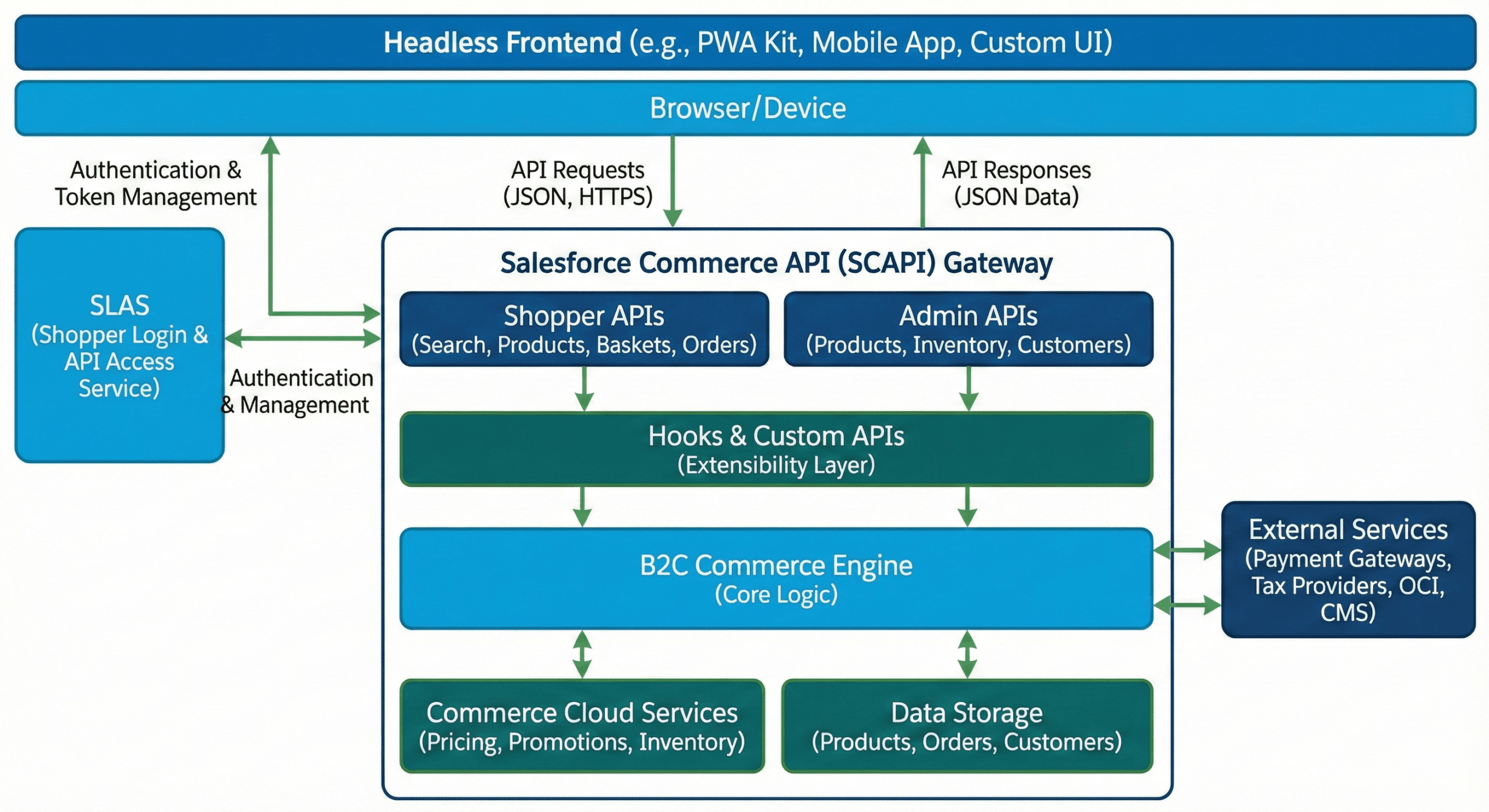
Salesforce Commerce API (SCAPI) is at the heart of the digital commerce revolution. As the landscape shifts from rigid, monolithic platforms to flexible, composable architectures, understanding SCAPI has become a mandatory skill for modern commerce architects and developers.
Table of Contents
Whether you are migrating from a legacy system or building a brand-new headless storefront, this guide acts as your definitive roadmap. We will take you from the foundational concepts of RESTful architecture to advanced implementation strategies, security models, and performance tuning.
1. The Architectural Shift: Why Headless Matters
To understand Salesforce Commerce API (SCAPI), we must first understand the environment it operates in. Historically, Salesforce B2C Commerce (formerly Demandware) relied on a monolithic model known as SiteGenesis and later, the Storefront Reference Architecture (SFRA).
The Monolithic Era vs. Composable Commerce
In the monolithic model, the frontend (what the user sees) and the backend (the commerce engine) were glued together. They ran on the same servers and used proprietary languages like ISML templates. While this offered a unified environment, it came with significant drawbacks:
- Dependency: A small frontend change often required a full full-stack deployment.
- Rigidity: You were locked into specific technologies (jQuery, Bootstrap).
- Scaling: You couldn’t scale the frontend independently of the backend.
Enter Headless Commerce.
Headless commerce decouples the “head” (frontend) from the “body” (backend). SCAPI is the nervous system connecting them. It exposes robust capabilities—pricing, promotions, baskets, and inventory—via standardized RESTful APIs.
Actionable Insight: This architecture allows you to build “Composable Storefronts.” You can use a React-based PWA for the web, a Swift app for iOS, and a custom kiosk app, all consuming the same SCAPI endpoints to ensure consistent business logic.
2. SCAPI vs. OCAPI: A Strategic Comparison
A common question among developers is: “What about the Open Commerce API (OCAPI)? Is it dead?”
For over a decade, OCAPI was the standard for headless interactions. However, SCAPI is a complete re-architecture designed for the high-concurrency demands of modern shopping.
Feature Comparison Table
| Feature Domain | Open Commerce API (OCAPI) | Salesforce Commerce API (SCAPI) |
| Architecture | Direct access to App Servers | API Gateway with embedded eCDN |
| Standard | Proprietary REST-like | OpenAPI Specification (OAS 3.0) |
| Authentication | OAuth 2.0 (Complex) | SLAS (OAuth 2.1) |
| Caching | Manual configuration | Integrated eCDN caching |
| Rate Limiting | Basic quotas | Advanced load shedding & Headers |
| Best Use Case | Legacy jobs, Deep backend access | High-scale Shopper Traffic |
The API Grouping Strategy
SCAPI is not just one big API; it is divided into two distinct families:
- Shopper APIs: The engines of your storefront (Search, Products, Baskets). They are designed for massive scale and are secured via SLAS.
- Admin APIs: Used for backend management (Inventory updates, PIM syncs). These should never be called from a shopper’s browser.
Pro Tip: Your roadmap should be hybrid. Use SCAPI for 95% of your shopper-facing traffic. Reserve OCAPI only for niche administrative tasks that SCAPI doesn’t cover yet (like complex system object manipulation).
3. Security and Authentication: The SLAS Framework
Security in a headless environment is vastly different from session-based web apps. SCAPI relies on the Shopper Login and API Access Service (SLAS). This is a centralized authority that manages access using OAuth 2.1 standards.
Public vs. Private Clients
Implementing SLAS starts with defining your clients:
- Public Clients: Used for apps running in “insecure” environments where code is visible (e.g., Browsers, SPAs, Mobile Apps). Because they cannot keep a secret, they use PKCE (Proof Key for Code Exchange) flows.
- Private Clients: Used for “Backend for Frontend” (BFF) architectures (e.g., Node.js servers). These can store a
client_secretand handle more privileged operations.
The Authentication Lifecycle
1. The Guest Flow
Most traffic is anonymous. SCAPI treats guests as first-class citizens.
- Request: The app asks SLAS for a guest token.
- USID: SLAS returns a JWT containing a Unique Shopper ID (USID). This ID anchors the session, allowing baskets to persist across page reloads.
2. The Registered User Flow
When a user logs in:
- Exchange: The app sends credentials (or a Google/Facebook token) to SLAS.
- Upgrade: SLAS validates the user and upgrades the token from “Guest” to “Registered.”
- Refresh: Access tokens are short-lived (30 mins). Your app must handle the
refresh_tokento keep the session alive without forcing the user to log in again.
Warning: Token Bloat. Be careful with Scopes (permissions). If you add too many scopes (e.g.,
sfcc.shopper-baskets-orders.rw), your token size increases. This is called “Token Bloat” and can cause header overflow errors in CDNs. Only request the scopes you actually need.
4. The Discovery Domain: Search & Products
The Shopper Search API is the powerhouse of discovery. It handles linguistic processing, sorting rules, and category structures.
Querying and Refinements
The product-search endpoint is incredibly versatile. It supports:
- Keyword Search:
q=running shoes - Refinements: Filtering by color, size, or price (
refine_1=cgid=mens). - Sorting: Applying business rules defined in Business Manager (e.g., “Newest” or “Best Match”).
The “N+1” Problem and Expansion
To optimize performance, you want to minimize HTTP requests. SCAPI supports an expand parameter.
Instead of making one call for search results and then 10 separate calls for product images, you can request:
expand=images,prices,availability
Trade-off: Heavy expansion increases the JSON response size and server processing time. It can also impact caching (see the Performance section below).
5. The Transactional Core: Baskets & Carts
The basket is the most complex entity in SCAPI. The shopper-baskets API (specifically V2) gives you granular control over the cart lifecycle.
Temporary Baskets
This is a game-changer for User Experience (UX).
- Scenario: A user wants to estimate shipping costs without logging in or creating a full cart.
- Solution: Create a “Temporary Basket.” You can add items and addresses to calculate totals using the commerce engine’s logic, but the data is ephemeral and doesn’t pollute the persistent database.
Merging Contexts (The “Login” Problem)
What happens when a Guest with items in their cart logs into an account that already has a saved cart?
SCAPI provides a mergeBasket endpoint.
- Function: It moves items from the Guest basket to the Registered basket.
- Privacy Note: PII (like shipping addresses) entered by the guest is not automatically merged to protect user privacy. You must handle this data transfer explicitly in your frontend logic.
6. Checkout, Payments, and Order Placement
Checkout is where security meets reliability. The goal is to collect money without ever letting raw credit card data touch your Salesforce servers.
The Payment Flow
- Tokenization: Your frontend (browser) sends credit card data directly to a provider like Stripe or Adyen.
- Token Receipt: The provider returns a secure token.
- Instrument Creation: Your app sends this token (not the card number) to SCAPI via the
addPaymentInstrumentendpoint. - Capture: When the order is created, a server-side Hook triggers to capture funds using that token.
Order Validation Sequence
Before an order is placed, SCAPI runs a strict validation:
- Are all required fields present?
- Is the inventory still available? (If sold out, the API throws an inventory error).
- Is the payment valid?
7. Extending SCAPI: Hooks & Custom APIs
No two businesses are alike. You will need to customize the logic. SCAPI offers two paths:
1. SCAPI Hooks
Hooks allow you to “intercept” standard API calls.
- Example: You want to prevent users from adding alcohol to a cart if their shipping address is in a “dry” county.
- Implementation: You write a
beforePOSThook on the Basket endpoint. The API pauses, runs your script, and either proceeds or returns an error based on your logic.
2. Custom API Endpoints
Sometimes you need a totally new feature, like checking a loyalty point balance.
- Solution: Build a Custom API.
- Tech: You define the contract using OAS 3.0 and write the logic in B2C Script.
- Path: These are exposed under distinct namespaces (e.g.,
/custom/loyalty/v1...) to avoid conflicts with future Salesforce updates.
8. Client-Side Development: PWA Kit & SDKs
Salesforce provides powerful tools to speed up development so you don’t have to write raw HTTP requests.
Commerce SDKs
- Isomorphic SDK: Runs on both Node.js and the browser. It handles header injection and token management automatically.
- React SDK: Provides React Hooks like
useProductoruseBasket, making it incredibly easy to wire up your UI to SCAPI data.
The PWA Kit & Managed Runtime
The PWA Kit is an opinionated framework for building storefronts. It runs on the Managed Runtime (MRT), a serverless-like environment optimized for B2C Commerce.
- Session Bridging: A critical feature for hybrid sites. It allows users to jump between a legacy SFRA page and a new PWA page without losing their login state or cart contents.
9. Operational Excellence: Performance & Caching
In headless commerce, caching is the difference between a 200ms load time and a 2-second lag.
The “Lowest Common Denominator” Rule
SCAPI responses are cached by an embedded eCDN. However, when you use the expand parameter, you trigger a specific caching rule:
The entire response is cached based on the item with the shortest Time To Live (TTL).
- Example: You search for products (Cached for 1 hour). You expand the request to include real-time Inventory (Cached for 0 seconds).
- Result: The entire search response becomes uncacheable (0 seconds).
- Fix: Be strategic. Fetch static product data in one call, and real-time inventory in a separate, client-side call.
Rate Limiting & Load Shedding
SCAPI protects itself from bots using rate limits. Your app must monitor headers like X-RateLimit-Remaining.
In extreme cases (like a massive bot attack), the system triggers Load Shedding. Interestingly, SCAPI is smart enough to prioritize “Checkout” traffic over “Browse” traffic during these events to protect your revenue.
10. Frequently Asked Questions (FAQ)
Can I use SCAPI with my existing SFRA site?
Yes! This is a hybrid approach. You can build new features (like a Product Picker) using SCAPI and embed them into your legacy SFRA site.
Is SCAPI slower than OCAPI?
generally, no. SCAPI uses a modern eCDN and is optimized for edge delivery. However, poor implementation (like over-fetching data) can make it slower.
Does SCAPI handle taxes?
SCAPI provides hooks to integrate with third-party tax providers (like Avalara or Vertex). It doesn’t calculate complex taxes natively but facilitates the connection.
Can I use SCAPI for a mobile app?
Absolutely. SCAPI is platform-agnostic. Your iOS or Android app acts as a “Public Client” consuming the JSON data.
Conclusion
The shift to the Salesforce Commerce API (SCAPI) is more than just a technical upgrade; it is a strategic adoption of agility. By decoupling the frontend from the backend, brands can experiment faster, scale easier, and provide richer user experiences.
Key Takeaways:
- Adopt SLAS: Security is the first step.
- Use Hooks wisely: Customize logic without breaking the upgrade path.
- Watch your Cache: Understand how
expandaffects performance. - Embrace PWA Kit: Don’t reinvent the wheel; use the provided SDKs.
Ready to Start?
Begin by auditing your current OCAPI usage and mapping out a migration plan to SLAS. The future of commerce is headless, and SCAPI is your bridge to get there.
Resource: SFCC DOC
How does OCI (Omnichannel Inventory) fit in?
OCI is a separate service for high-scale inventory. SCAPI integrates with OCI to check stock across multiple locations (stores, DCs) seamlessly.